White square in top left corner

I see there is a white box at the top of my event page. I know I can change the color of this box, with the 'accent' color, however I want to remove this altogether. When I click on this square, it looks like it opens up a side bar on the left, but there is no information on it. Can you please help me fix this?
Thank you!
-
Official comment

Hi Callie -
Thank you for reaching out. Happy to help
What you're referring to is the event website menu. This menu displays all the sections you add to your event website to make it easier for your invitees to look for specific event information (e.g. schedule of events, map, etc.). If you disable the "Show section in menu" option for a block, it will not be displayed in the menu, which could result in having an empty white space if all blocks are disabled from the menu.
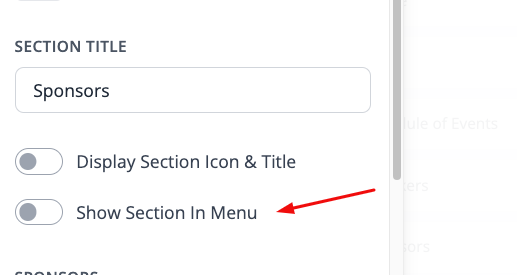
You can remove this menu icon on desktop by disabling all event blocks from being shown in the menu, but the menu icon will still remain in the mobile preview and cannot be fully removed.
I hope this was helpful. If any other questions come up, feel free to reach out!
Best,
The RSVPify Team
Please sign in to leave a comment.
Comments
1 comment