Send QR codes at a later time (not in confirmations)

Hello! I hope someone can help me out here.
I don't want my guests to receive their QR codes for check-in immediately after they submit their registrations. Instead, I'd like to send them a reminder about the event 14 days before the event and I would like to include their QR codes then. Is this possible? I couldn't find a way to do this myself and any help would be appreciated!
-
Official comment

Hi Julie,
Thanks for the question - happy to help!
You will first need to disable the QR codes in your confirmation emails (via Event Settings > Email Confirmations & Reminders):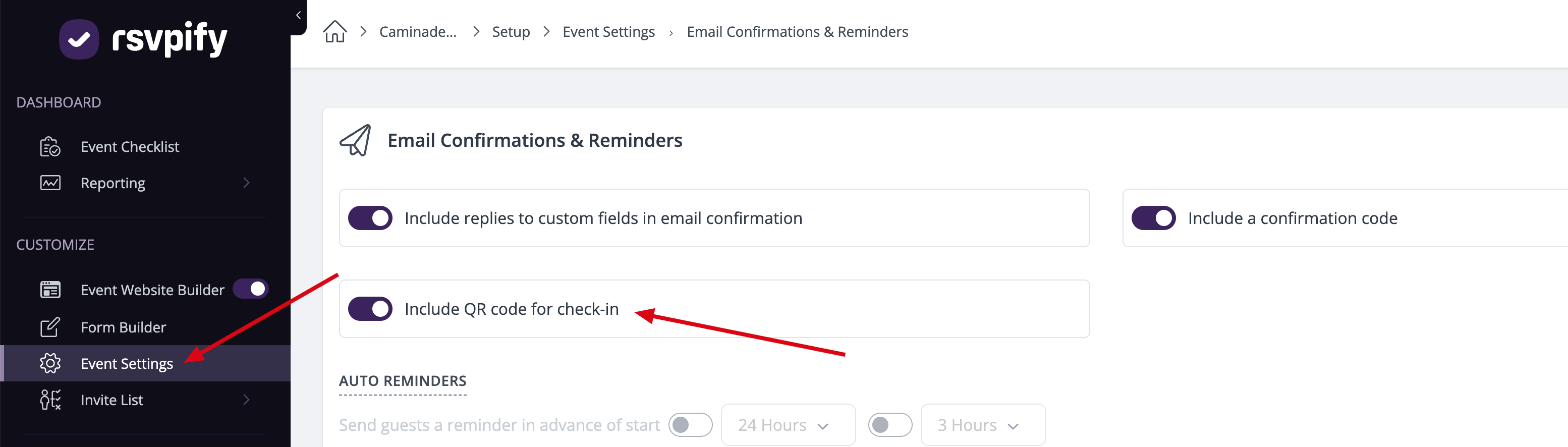
After doing this, save your changes - QR codes will no longer be sent via confirmation emails.
The next step will be to go to your Email Builder and draft an email reminder - this email should contain the relevant details for your event, and you will need to use the merge tags feature to add a QR code -- see detailed instructions here.
After creating this email, choose the recipients audience and then schedule it to be sent 2 weeks ahead of the event.
Hope this helps but let us know if something else comes up!
Best,
Betty
The RSVPify Team
Please sign in to leave a comment.
Comments
1 comment