Check-in for multiple events?

If I have 2 secondary events and I need to check guests in for both, do I have to create two separate events and use check-in feature?
-

Hi Nathanael!
Good question - happy to clarify things there!
It is not necessary to create a new event in your dashboard for each check-in activity. You can check your guests in by resetting guests to unseen and launching the check-in app for a new event/session. They can use the same QR code, and data of all events will be stored. Here is one article that can help with a check-in: What information can I see when I check in a guest? Also, for reference, you can set the guests to unseen in the check-in app> settings:
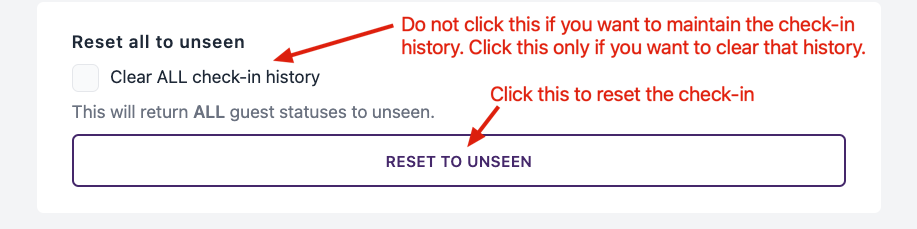
I hope this clarifies things, but do let us know if further questions arise!
Best,
Lucy
The RSVPify team0 -

Follow up to this! How does it show up when I export my attendees after the event? Can I "name" the different check ins or does it separate by time slot, etc.
Our event has three different events in one day and we want to be able to distinguish who came to 3 vs 2 vs 1 event.
Thanks!
0
Please sign in to leave a comment.
Comments
2 comments